Business Finance Suite

Know exactly where your business stands

Gross, net, and every open invoice in one view, plus every expense and what each horse, trailer, and piece of equipment earns and costs. Pass-through costs stay out of income so the totals stay true, and automated reports your accountant will thank you for. Use the suite on its own, or let the schedule feed it.

Bill, Collect, Track, Report

Everything the business side needs

Tools that help you be financially savvy and organized while doing less

Billing & Invoicing

Charges accrue as the day happens while the invoice writes itself

Every finalized lesson, school horse fee, and add-on becomes a charge on the client's draft. On your billing day, board and recurring charges are applied and the draft becomes an open invoice and gets sent out. Add a line item by hand any time, and choose whether the platform fee is included in your pricing or passed on.

  • Draft, open, paid, and past-due at a glance
  • Late fees and reminders that run themselves
  • Every charge clearly itemized
Billing & Invoicing in depth
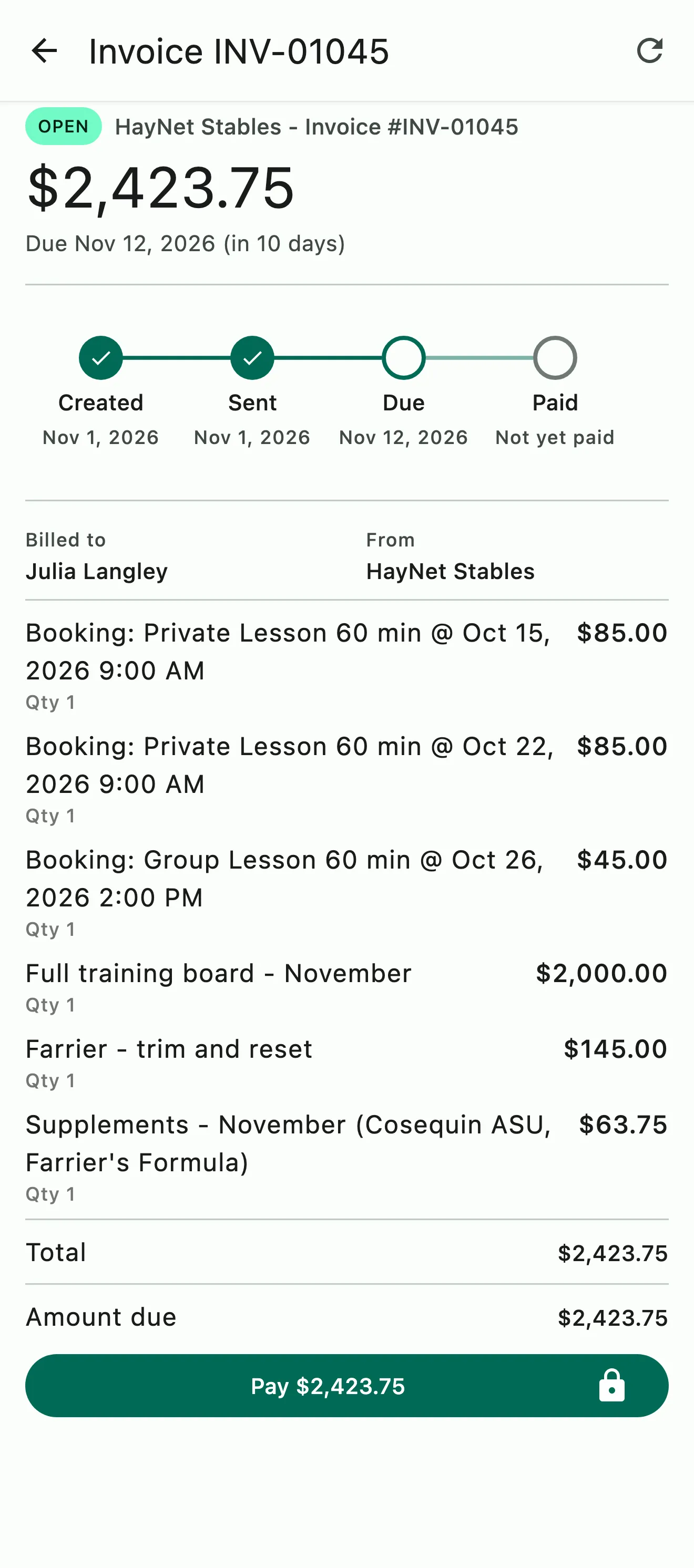
An invoice with each lesson booking on its own line, plus board, farrier work, and supplements

Group & Split Billing

Invoice for the horse show on the go, in minutes

Billing a group or splitting a charge has never been easier. Invoice for a show, a clinic, or a shared expense among the people involved. Group billing allows you to bill an item to the whole group and split charges by horses, people, or custom share. You can even split by horse where multiple people are sharing a horse.

  • Bill a charge to the whole group or selected members of the group
  • Split by rider, by horse, or by custom share
  • Charges can be invoiced off-cycle or merged into your clients' regular invoices
Group & Split Billing in depth
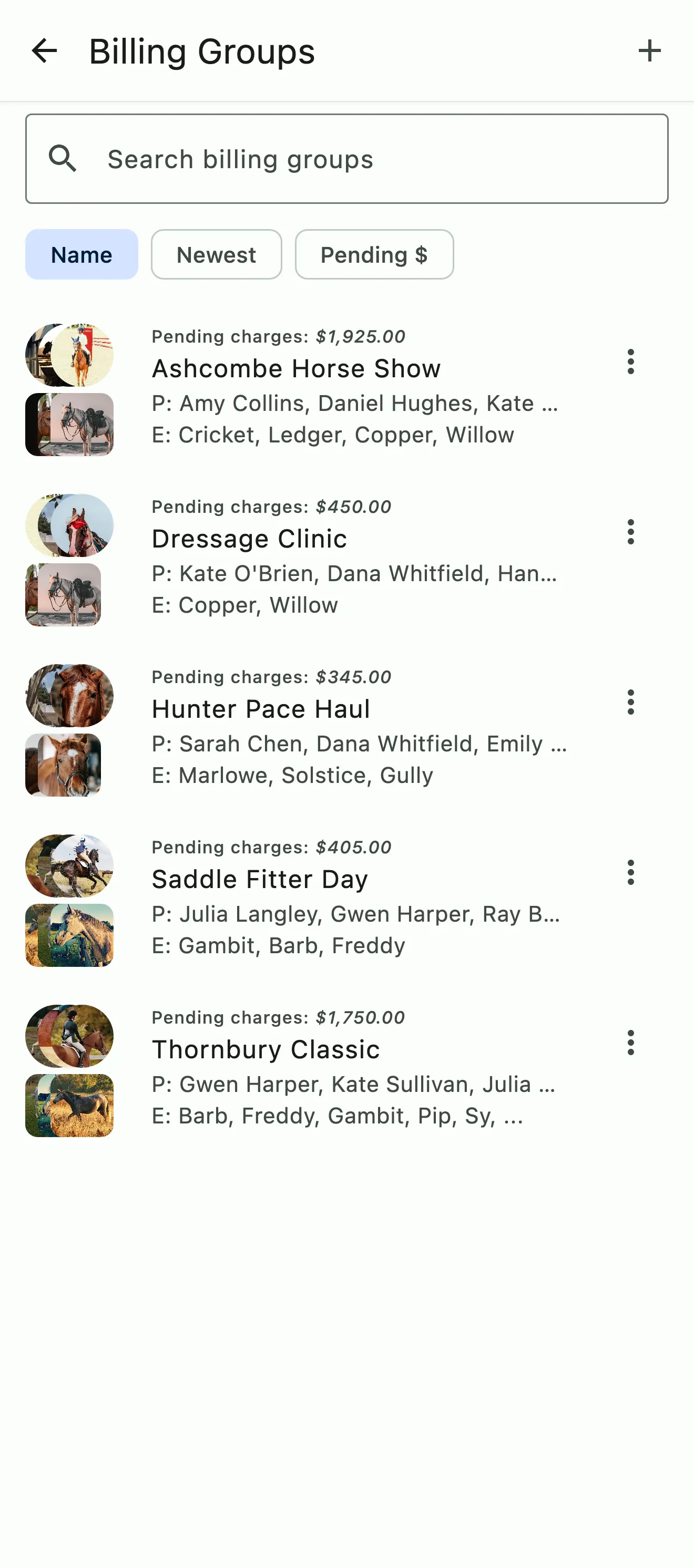
Billing groups for two horse shows, a clinic, a hunter pace haul, and a saddle fitter day, each with its people, horses, and pending charges

Payments

Paid from the client's phone, paid out to your bank.

Clients pay invoices from the app or an emailed pay-by-link, by bank or card, no login required. Our family account feature allows parents to easily pay and manage the whole family's charges. Payments are deposited into your bank and recorded into your accounting ledger.

  • Pay in the app or from a link, by bank or card
  • Family accounts allow parents to manage the whole family in one place
  • Payments deposited into your bank and recorded into your accounting ledger
Payments in depth
An invoice with each lesson booking on its own line, plus board, farrier work, and supplements

Expenses & Asset Management

Costs and revenue tied to the horses and equipment behind it

Capture expenses as they happen, tag reimbursement charges so they're billed back and kept out of income, set up recurring expenses to never miss a cycle, and track horses, trailers, and equipment as assets with the income and expenses linked to each. See what every one earns and costs over time; mark sold or archive when it leaves the farm.

  • Pass-through costs billed back to the right client so they don't get counted as income
  • Set up recurring expenses or record a one-off entry
  • Assets: what each horse, trailer, and piece of equipment earns and costs
Expenses & Asset Management in depth
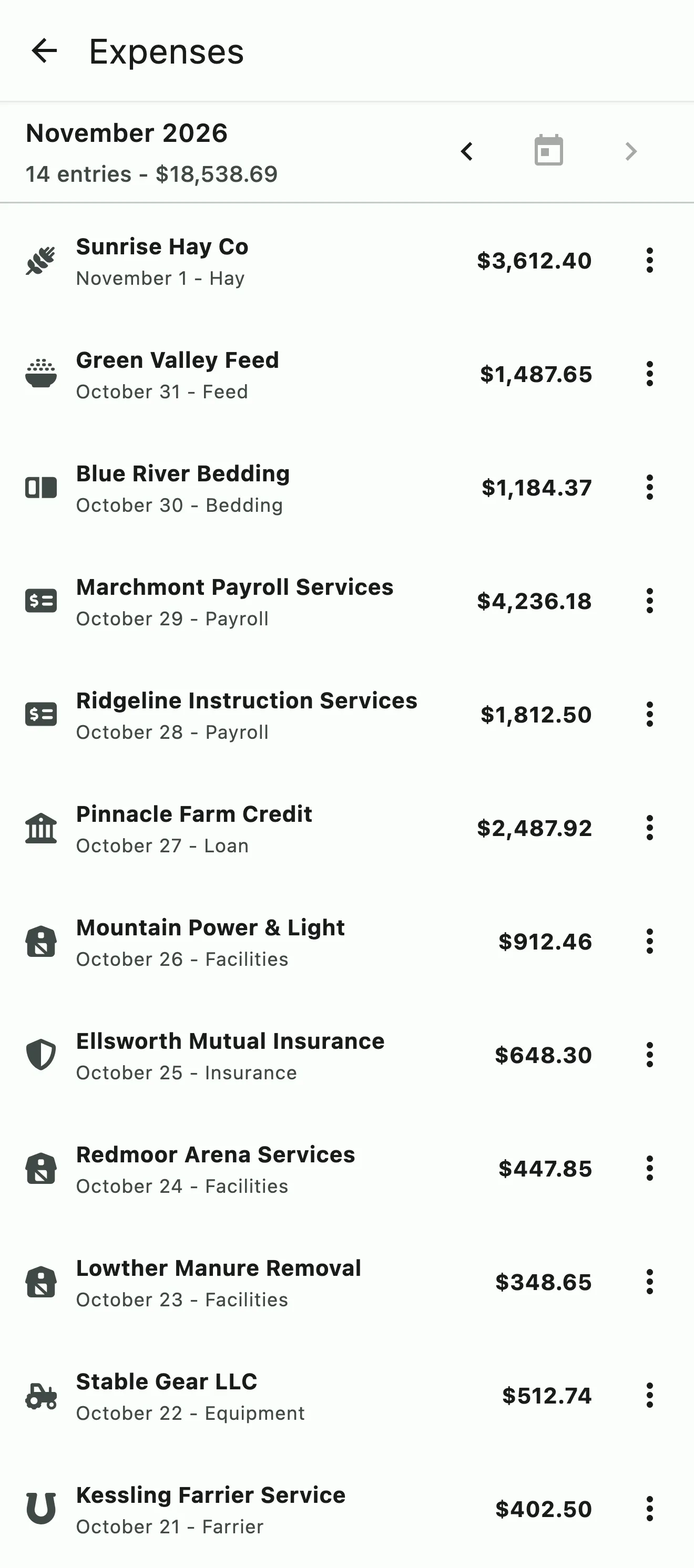
The month's expenses by vendor and category, with the month's total

Revenue Analytics & Insights

Real-time revenue tracking, analytics, and insights

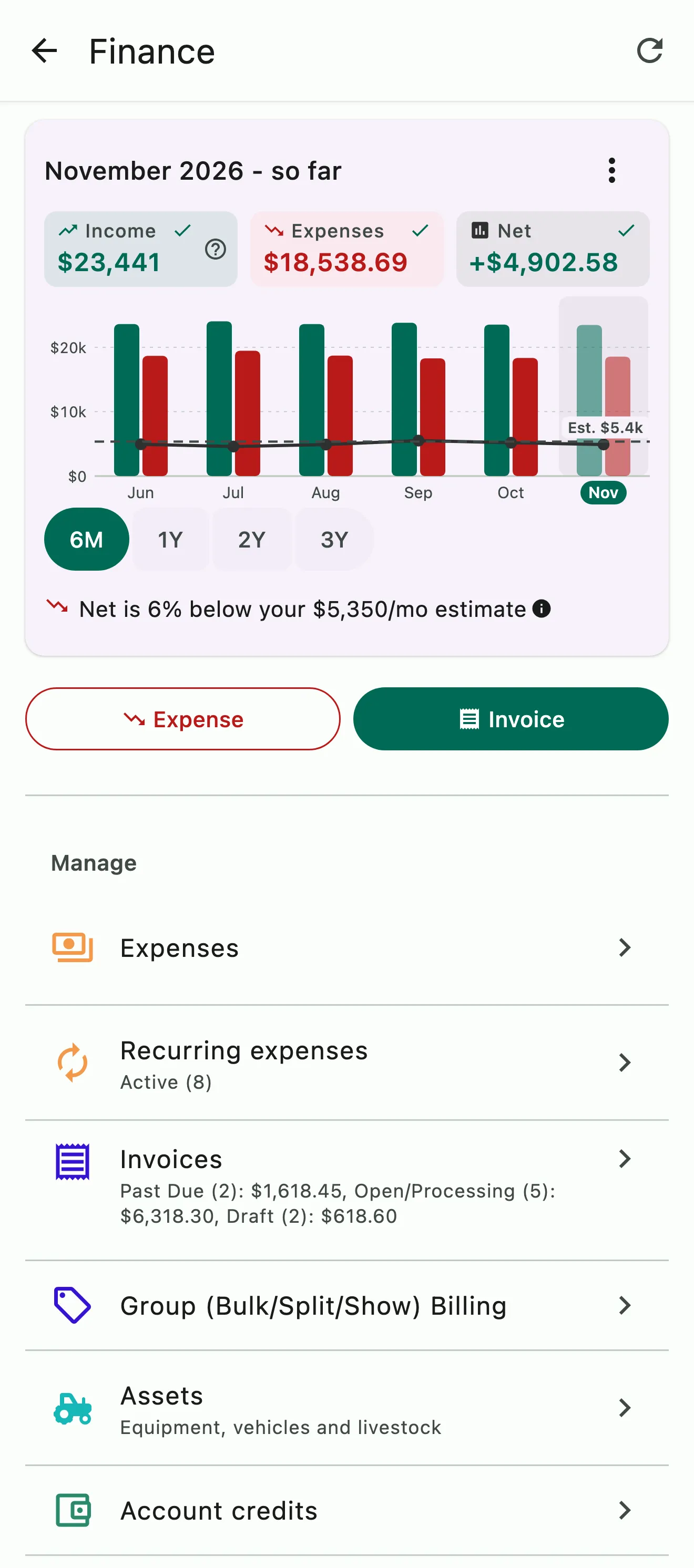
Always know how your business is doing without cobbling together spreadsheets. Know which invoices are paid, open, or past due, what came in, and what went out. Compare your metrics to last month or last year and see analytics and projections based on your numbers. Know where you stand against your estimates and stay on track with easy-to-use data visualizations.

  • Real-time tracking of invoice statuses, revenue, expenses, and net income
  • Visually compare revenue, expenses, and net, month over month or over a selected period of time
  • See where your real numbers stack up against your estimates
Revenue Analytics & Insights in depth
The Finance home: six months of income, expenses, and net against the monthly estimate

Reports & Accounting

Accounting reports that build and send themselves

Download your payments, transactions, and expenses for any date range, or have them emailed to your bookkeeper automatically on a schedule. Ready-to-import QuickBooks, Xero or CSV files keep your books accurate, organized, and up to date. It's the kind of bookkeeping accountants love.

  • Download revenue, expense, and transaction reconciliation reports for any time period
  • Reports emailed to your bookkeeper and anyone else you choose on a regular schedule
  • QuickBooks, Xero, and CSV exports
Reports & Accounting in depth
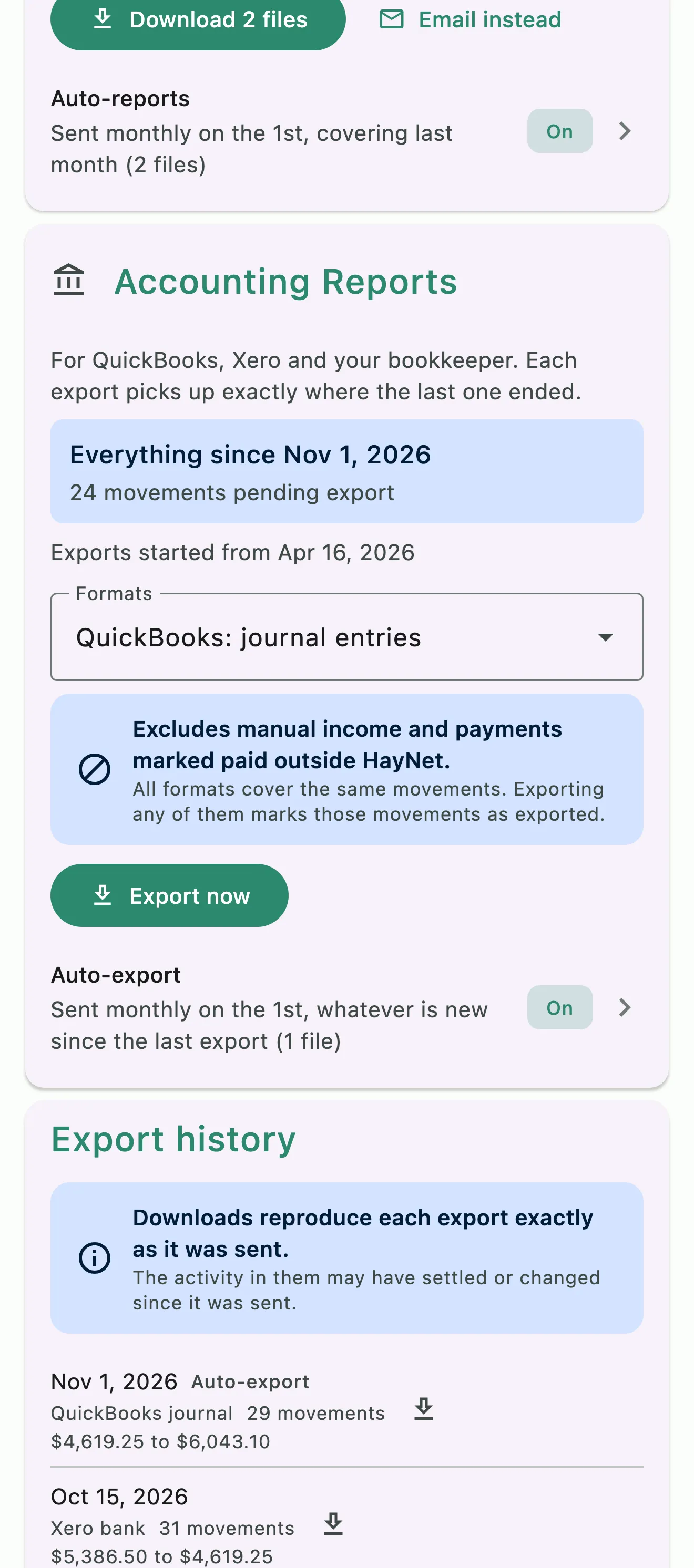
Accounting Reports: movements waiting to export, the QuickBooks format, auto-export, and export history

Set up board, packages, and subscriptions once in Operations Tools, and every renewal and credit is added to the right invoice automatically. Explore Operations Tools

On its own, or connected

The Finance Suite doesn't need the schedule, but it's better with it.

On its own

Create invoices manually, add one-off charges, bill your horse show group and split costs, take payments online, track invoice statuses, log expenses, track assets, and pull reports. Many barns run exactly this way.

With the schedule, tasks, and subscriptions

Every finalized lesson, training ride, billable booking, and add-on becomes a charge on the client's invoice. Board, packages, and subscription products renew onto the invoice every period. Nothing needs to be manually tracked or recorded. Everything finds its way to the invoices, ledger, and accounting reports. All you have to do is set it up.

The Finance home insights card

Revenue Analytics & Insights

Stop guessing and start knowing

See invoice statuses, revenue, expenses, and net income in real time, without cobbling together spreadsheets. Compare them month over month or over a period you choose, and see where your real numbers stack up against your estimates.

Explore Analytics & Insights

Finance FAQ

Common Questions

Can I use the finance tools without the schedule?

Yes. The Business Finance Suite stands on its own: write invoices by hand, add one-off charges, split a show, take payments online, log expenses, and pull reports, with no schedule at all. Many barns run exactly this way.

When you're ready to connect the schedule and subscriptions, every finalized lesson, school horse fee, and add-on becomes a charge on its own, and board, packages, and subscription products renew onto the same invoice. Nothing is entered twice.

How are automated invoices generated?

From the schedule. Every lesson, training ride, school horse fee, and add-on becomes a charge on the client's draft invoice once the event is completed and finalized, about 48 hours after it ends. Board, prepaid packages, and subscription products renew onto the same draft, and bookings covered by package credits show as zero-dollar lines with the event details.

On your billing day the draft becomes an open invoice and goes to the client by app notification and email. No manual entry required.

Can clients view and pay their invoices online?

Yes. When an invoice is sent, the client gets an app notification and an email, and can see the full breakdown in the HayNet app or from the link in the invoice email. They pay right there, by bank or card.

The invoice link works without the app or a HayNet account, so a parent, a spouse, or whoever pays the bills can pay it directly.

Does HayNet work with QuickBooks or Xero?

Yes, through exports built for each. Under Manage › Finances › Reports, the Accounting Reports card exports QuickBooks journal entries, QuickBooks bank transactions, and a Xero bank statement, ready to import. It also exports a detailed CSV statement for any other accounting software.

Each export picks up exactly where the last one ended, and charges and reimbursements are already told apart, so your books match HayNet without a cleanup pass at the end of the month.

How do I set my billing cycle date?

Open Manage › Finances › Billing settings. Choose your Default Billing Period, monthly or weekly, and your Default Billing Day, and set how many days clients have to pay under Invoice Due (days).

An Event Product can have its own billing period that overrides the default: edit it under Manage › Event Products and set Override Billing Period.

See the full FAQ

Make informed decisions for a stronger future.

No card required. Available on Apple iOS, Android and Web.